
Your subject matter experts have the answers, but turning a slide deck, research report, or rough draft into a clear, findable post takes time they don’t have. Knowledge sits in drafts or goes live without summaries and tags, so your people and your AI can’t find it when it matters.
AI-Powered Authoring Tools Built for Busy Experts
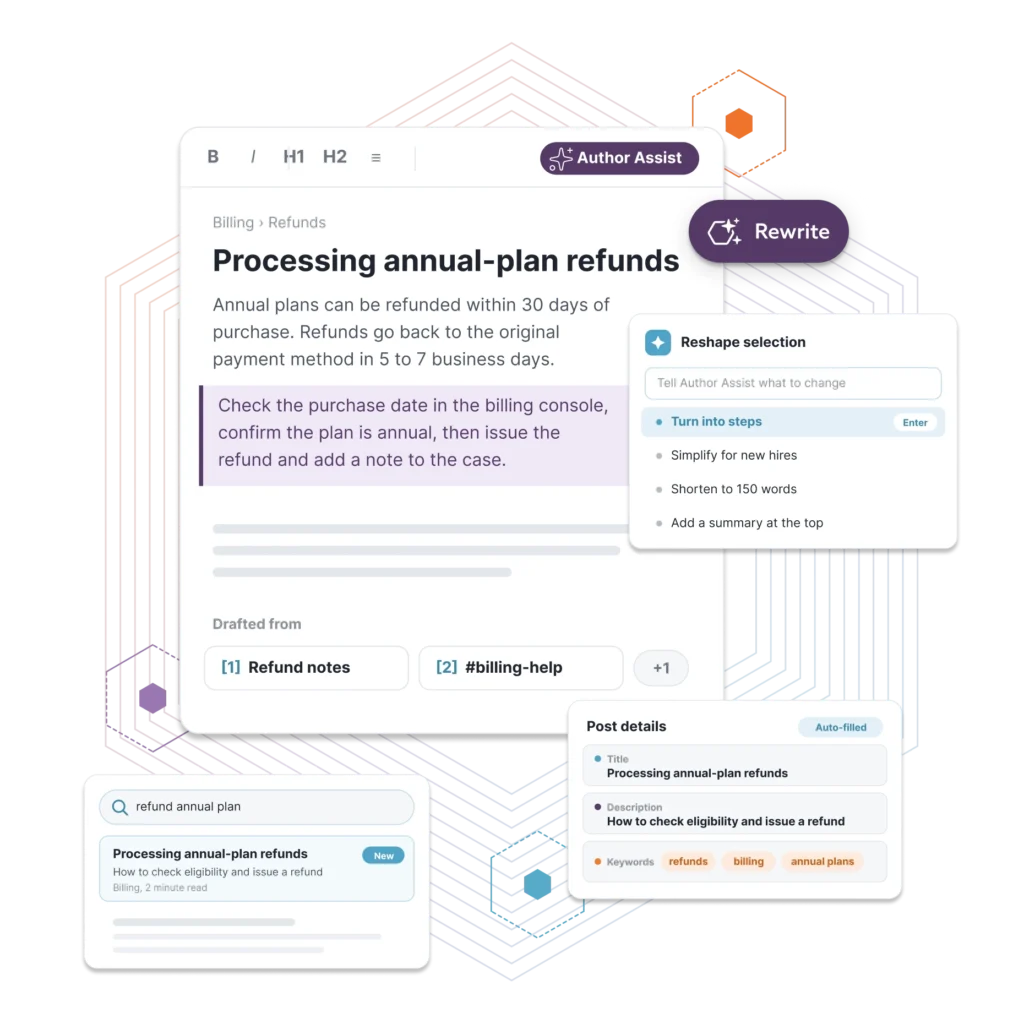
Your team captures expertise fast. Turning it into a clean, findable post is what takes the time. Author Assist closes that gap from inside the editor. It drafts from your source material, reshapes it on command, and writes the titles and descriptions people usually skip.
See Bloomfire’s AI Authoring tools in ActionYour Best Expertise Stalls Before It Gets Published

Turn Original Expertise
Into Publish-Ready Knowledge
Bloomfire’s AI-Powered Authoring tools start from your contributors’ own work. Add source content to a post, and Author Assist builds the summaries, takeaways, and structure that make knowledge easier to read, search, and act on. Highlight any generated text and refine it again until it’s ready to publish.
Summaries on Demand: Generate a simple, detailed, or very detailed summary of any post, roughly 50, 180, or 500 words, so readers get the point before they scroll.
Takeaways and Expanded Insights: Pull 3, 5, or 7 key points from source text, or enter a single idea and let Author Assist expand it into a simple or detailed explanation.
Titles, Tags, and Tone: Generate titles and summaries from uploaded content, apply tags automatically so posts surface in search, and refine tone to fit your audience.
AI Authoring Built Into Every Post
Author Assist and Dynamic Content Blocks take on the slowest parts of writing knowledge: getting a first draft down, reworking it, finishing the details, and keeping every version current.

Leverage existing content
Most training content starts as something else: a policy doc, a call transcript, a slide deck. Paste that source material into the body, and once there are roughly 150 characters, Author Assist can pull insights from it.

Reshape without rewriting
A draft rarely comes out right the first time. Highlight a section, and Rewrite offers four ways to adjust it: Adjust Tone, Format as a List, Simplify Language, and Shorten, so editing means refining what’s there, not retyping it.

Generate metadata from the body
A strong title and description are usually the last thing anyone writes, if they get written at all, and posts without them are harder to find. Author Assist writes both from the body you’ve already drafted.

One edit for all
E-learning content usually has to say the same thing several different ways, for different teams, roles, or regions. Dynamic Content Blocks let an author write it once and edit it from a single location, with variants that swap in automatically based on who’s reading.
Companies using Bloomfire typically see…
183
%
increase in published knowledge articles in first 6 months of using Bloomfire
95
%
say content is more frequently used and better understood since implementing Bloomfire
2
X
Bloomfire customers see 2x year-over-year growth in questions asked in the platform

Built For Authors To Trust, Not Just Admins To Enable
Author Assist isn’t a black box. Access is configurable per community, from Owners only up to every Author-level user.
The core commands: Adjust Tone, Format as a List, Expand on a Topic, and more are documented in the API for teams that want programmatic access instead of only working through the editor.
Talk to our expertFrequently Asked Questions
Author Assist is Bloomfire’s AI-powered authoring tool built into the post editor. It drafts from source material, adjusts tone and length, formats text as lists or takeaways, and generates a title and description, all from the same button at the top of every post.
It needs a starting point, roughly 150 characters in the body. Paste in source material to get past that threshold, then Author Assist can summarize it, pull out key takeaways, or expand on a topic. Once you have a draft, the same tool can adjust the tone, shorten it, or reformat a highlighted selection instead of rewriting the whole thing.
Access is configurable per community: Owners only, Community Admins and higher, Group Admins and higher, or every Author-level user. Whoever manages your community settings controls which tier gets access.
A section drafted with Author Assist can be turned into a Dynamic Content Block, edited from a single location, and reused across multiple posts. Variants can be mapped to organizational attributes, so different teams or regions see a version tailored to them without a separate copy to maintain.
Yes, on the high end. Posts running into the range of 80,000+ words trigger a warning that the content is too large, and Insert gets disabled until it’s trimmed. For most policy docs, transcripts, and training material, that’s well out of range.
Yes, though the interface adapts rather than staying identical. The top button collapses to icons only, or moves to its own line, as the screen narrows, and generation windows go full-screen instead of the desktop modal. The underlying commands, Rewrite and Generate Title and Description, all work the same; only the layout changes.
Your content is never stored with the language model or used to train it. Author Assist works only with content inside your Bloomfire community, not the open internet or outside sources.

Build your knowledge ecosystem
Connect knowledge pools of documents, conversations, media, data, and expertise with your Persistent Semantic Memory™ to ground your AI. Use our turn-key of connectors or build your own to connect to any enterprise systems.

Sign up for Innovation
The pace of innovation with AI is accelerating. Join an alpha group for early access to new turnkey Intelligence Modules, and help shape what comes next.