
Knowledge Connectors 101: Syncing Business Applications into One Source of Truth

Betsy leads the customer success and implementation teams at Bloomfire and is a Certified Knowledge Manager (CKM) from KM Institute. Passionate about the people side of knowledge engagement and knowledge sharing, she brings real-world experience in tackling the challenges companies face with knowledge management.

Summary: Knowledge connectors centralize your organization’s information into one accurate, always up-to-date source of truth by authenticating, syncing, updating, and quality-checking each connected app’s content.
Everyone knows that information exists somewhere, but somewhere is a moving target. This is exactly the gap that knowledge connectors are built to close, automatically syncing content from across the tech stack into a single, searchable system of record.
That gap isn’t just an annoyance. It’s the difference between a team that trusts its knowledge base and one that reflexively pings a coworker on Slack because searching feels like a coin flip. As more organizations lean on artificial intelligence (AI) search and chat tools to answer questions on their behalf, the cost of fragmented knowledge only compounds. Below, we explore what knowledge connectors are all about and how they work.
What Are Knowledge Connectors?
Knowledge connectors are integrations that automatically sync content from external repositories, such as file storage systems, customer relationship management (CRM) systems, and support platforms, into a centralized knowledge base. Instead of asking employees to manually upload, copy, or re-create content in a new system, a connector pulls existing files and articles into the platform, keeps them updated on a schedule, and applies consistent governance and access rules along the way.
The goal isn’t to replace the tools teams already use. It’s to make sure that no matter where information originates, it becomes part of one trusted, single source of truth that’s actually searchable. As IBM’s research on unstructured data points out, roughly 80% of a company’s data is unstructured, spread across emails, chat platforms, and internal documents. Without a way to connect and index that content, most of it stays invisible to the people and AI tools that need it most.
Bloomfire is an example of what this looks like in practice. Rather than asking an organization to migrate everything into a new platform, Bloomfire’s knowledge connectors sync content directly from the tools teams already rely on. They also keep that content updated on a recurring schedule, and apply the same governance and content quality checks across every connected knowledge source. The result is a knowledge base that reflects what’s actually happening across the business, not just what someone remembered to upload manually.
Why Fragmented Knowledge Is an Expensive Problem
Before getting into how these integrations work, it helps to understand the cost of not having them. When information lives in disconnected silos, a few predictable things happen:
- Duplicate effort: Teams recreate documents, frequently asked questions (FAQs), and training materials that already exist somewhere else in the organization.
- Inconsistent answers: Sales, support, and product teams end up working from different versions of the truth, which leads to conflicting guidance for customers and employees alike.
- Slower onboarding: New hires can’t find what they need, so they lean on tenured coworkers to fill in the gaps, which drains everyone’s time.
- Weaker AI performance: AI search and chat tools are only as good as the content they can access. If half a company’s knowledge is locked in a tool the AI can’t reach, the answers it gives will be incomplete.
The cost of this fragmentation shows up in the numbers, too. According to McKinsey, giving employees a searchable, unified way to find information can raise knowledge worker productivity by 20% to 25%, largely by cutting the time people spend hunting for answers that already exist somewhere in the business. That’s not a small efficiency gain. Applied across an entire department, it can mean the difference between a team that spends its week creating value and one that spends it retracing steps other people have already taken.
Solving this isn’t just about search. It’s about giving an organization the essential knowledge management system features it needs to scale, including consistent tagging, permissioning, and content quality checks that a pile of disconnected files never had in the first place. A well-maintained knowledge base also becomes a stronger foundation for long-term knowledge retention, since content stops disappearing every time someone leaves the company or a tool gets swapped out.
How Knowledge Connectors Work
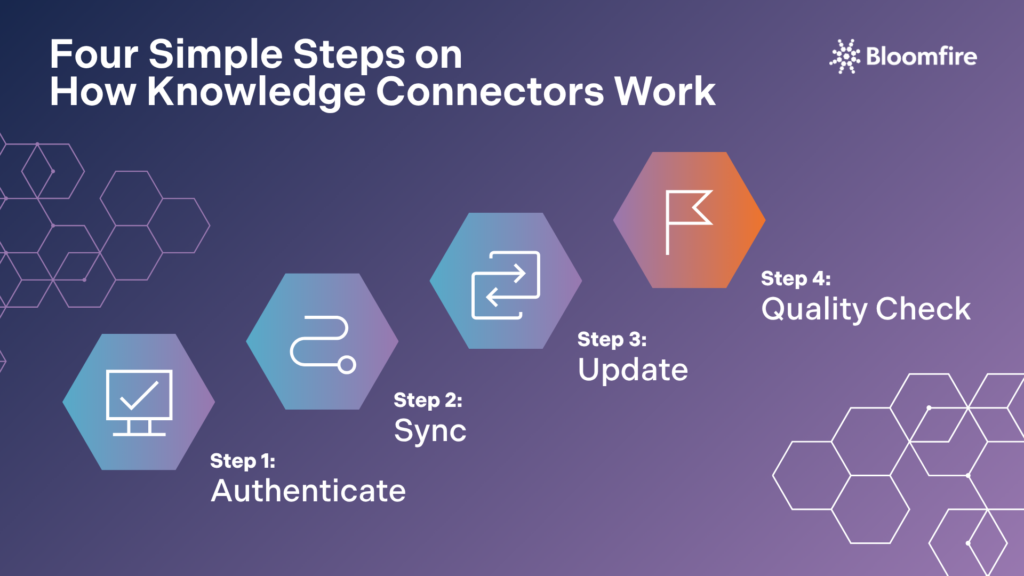
Building a knowledge connector for a new system might seem like it requires reinventing the wheel each time. However, most knowledge connectors follow a similar pattern, even though the underlying systems they connect to vary widely:
- Authentication and permissions: The connector authenticates with the source system, usually through a service account, and inherits or maps existing access controls so sensitive content stays restricted to the right audience.
- Initial sync: Existing content, whether that’s SharePoint files, Zendesk articles, Salesforce Knowledge articles, or GitHub documentation, is pulled into the knowledge base and indexed for search.
- Ongoing updates: Rather than a one-time import, most syncs run on a recurring schedule or in near real time, so edits made in the source system are reflected automatically.
- Content quality checks: Once content is synced, tools that flag duplicate, outdated, or conflicting information help keep the knowledge base clean instead of just larger.
Bloomfire’s own knowledge connectors follow this same sequence. A team connects a source system, such as SharePoint or Salesforce Knowledge, and Bloomfire handles the authentication, indexing, and recurring sync automatically. From there, Bloomfire’s content reliability tools continuously scan the synced content for duplicates, outdated information, or conflicting guidance. They then flag issues for the right owner to resolve rather than letting them quietly pile up. That combination, syncing content in and actively maintaining its quality once it’s there, is what turns a basic integration into an internal knowledge base people can actually trust.
This pattern is becoming an industry standard, not just a Bloomfire approach. Microsoft’s own Copilot connectors follow similar logic on the Microsoft 365 side, indexing external content into Microsoft Graph so Copilot can reason over it. Connect once, sync continuously, and let AI and search tools work across systems instead of being confined to one.
See How Bloomfire Connects It All
Discover how Bloomfire’s connectors unify your organization’s knowledge in one place.
Get a Live Walkthrough
It’s worth noting that not every connector behaves identically once it’s live. Some are built for one-way syncing, pulling content into the knowledge base without pushing anything back out.
Others support bidirectional flows, where updates made in the knowledge base can be reflected in the source system as well. The right setup depends on which system is considered the authoritative owner of a given piece of content. A support team that manages its help center in Zendesk, for example, likely wants Zendesk to remain the system of record, with the knowledge base simply reflecting the latest published version rather than allowing edits to happen in two places at once.
5 Common Types of Knowledge Connectors

Knowledge connectors aren’t one-size-fits-all. The right connector depends on where your team’s information actually lives and how that system structures its data. These integrations generally fall into a few categories, based on the kind of system they sync with:
- File repositories, such as SharePoint, Google Drive, and Box, where teams store documents, presentations, and spreadsheets.
- Collaboration and documentation tools, like GitHub, where product, engineering, and operations teams keep living documentation.
- Customer support platforms, such as Zendesk, where help center articles and internal support content need to reach a broader audience.
- CRM systems, like Salesforce Knowledge, where service and sales teams manage customer-facing articles and account notes.
- Meeting and call intelligence tools, such as Zoom and Gong, where recorded conversations contain insights that rarely make it into a searchable format anywhere else.
Bloomfire supports connectors across all five of these categories, which is part of what makes it a practical example to point to. A single organization might sync file storage from SharePoint, support content from Zendesk, and CRM articles from Salesforce Knowledge all into the same Bloomfire instance, without asking any of those teams to change the tool they use day to day.
Rather than forcing every team to change how or where they work, this approach meets content where it already lives and brings it into a shared layer that both people and AI systems can search. That’s a meaningfully different strategy than the old model of mandating a single tool for the entire company, which tends to fail because it fights how teams naturally operate.
Choosing Which Systems to Connect First
You don’t need to connect every system on day one. A more realistic approach is to prioritize based on where the most valuable, frequently referenced content already lives. Here are a few questions that can help guide that decision:
- Which systems do employees search most often? If a support team constantly digs through Zendesk for troubleshooting steps, that’s a strong early candidate.
- Where does content go stale the fastest? Fast-moving systems, like a sales team’s shared drive of pitch decks and competitive intel, benefit disproportionately from automated syncing, since manual updates rarely keep pace.
- What’s creating the most duplicate work today? If multiple teams are independently maintaining near-identical FAQ documents in different tools, connecting those sources can eliminate a lot of redundant effort in one move.
- Which systems have the clearest permission structure? Systems with well-defined access controls are usually easier to sync the first time correctly, which makes them a safer starting point than a messier, loosely governed repository.
A phased rollout also reduces the risk of overwhelming the team with too much data too soon. Connecting one or two high-traffic sources first lets the team see real results and adjust their approach before committing further resources. Starting narrow and expanding from there also gives a team time to validate that content quality tools are catching the right issues before scaling up to dozens of connected sources at once.
Connectors vs. App Integrations
It’s worth drawing a distinction here, since the two terms get used interchangeably but solve different problems. Knowledge connectors sync external content into a knowledge base so it becomes searchable alongside everything else. App integrations, by contrast, let users search and view knowledge base content from within the tools they’re already using, like Slack or Microsoft Teams, without switching tabs.
When the two are used together, they create a loop: connectors pull scattered content in, and app integrations push trusted knowledge back out to wherever people are working. Bloomfire offers both sides of that loop, syncing content in through knowledge connectors and surfacing it back out through app integrations with tools like Slack and Microsoft Teams. If you’re building out a broader integration strategy, it’s worth exploring Bloomfire’s integrations page to see how these categories fit together for a specific stack.
Best Practices for a Smooth Rollout
The difference between a rollout that sticks and one that fizzles usually comes down to how well teams plan for adoption, not just implementation. A successful rollout usually comes down to a few habits:
- Curating your syncs. Don’t connect an entire file repository indiscriminately. Scope connections to the folders, spaces, or projects that actually contain valuable, current information.
- Setting a review cadence. Even with automated syncing, someone should periodically check that connected content is still accurate and relevant.
- Mapping permissions carefully. Confirm that access controls from the source system translate correctly into the knowledge base, so people only see what they’re supposed to.
- Starting with your busiest systems. Prioritize the repositories teams reference most often, rather than trying to connect everything at once.
- Assigning clear ownership. Someone on the team, not just the tool itself, should be accountable for reviewing flagged content and resolving conflicts as they come up.
These steps matter because an integration of knowledge is only as valuable as the content quality behind it. A self-healing knowledge base that flags duplicates and conflicts automatically takes a lot of that ongoing maintenance burden off a team, which matters more as the number of connected systems grows. Without that layer of quality control, syncing more content simply means syncing more noise, which can make search results feel less trustworthy rather than more.
Why AI Search Needs Knowledge Connectors
AI search and chat tools are reshaping expectations for how quickly people expect to find answers, but those tools can only work with the content they can reach. If an AI assistant can search the knowledge base but not the Zendesk help center, GitHub docs, or Salesforce Knowledge articles, it’s going to miss things, and users will notice.
This is one of the clearest reasons why this category has become a priority for knowledge management and IT teams alike. Bringing scattered types of knowledge management systems together into one governed layer means AI tools have a complete, accurate picture to draw from rather than fragments. This is why more platforms across the industry are investing in this space rather than treating it as a nice-to-have.
There’s also a compounding effect worth calling out. As more systems get connected, the knowledge base doesn’t just get bigger; it gets smarter. Patterns across previously siloed content become visible for the first time: a support ticket trend that lines up with a recent product change, or a sales objection that a competitor’s playbook already addresses.
Start Building Your Connected Knowledge Base Today
The organizations that get the most value out of knowledge connectors tend to start small, connect the systems causing the most pain first, and expand as they prove out the process. There’s no need to solve for every integration on day one. What matters is choosing a knowledge management platform built to make that expansion straightforward as new needs come up, rather than one that treats each new connection as a custom project.
See Every Integration in One Place
Explore Bloomfire’s full library of knowledge connectors and app integrations.
Learn More
A file upload is a one-time, manual action. A knowledge connector automatically syncs content on an ongoing basis, so updates made in the source system are reflected in the knowledge base without anyone needing to re-upload anything.
Yes. Most connectors, including Bloomfire’s, are designed to inherit or map access controls from the source system, so content that was restricted in SharePoint, Zendesk, or Salesforce stays restricted once it’s synced.
A knowledge connector brings external content into a knowledge base. An app integration does the opposite, letting users search and view knowledge base content from within tools like Slack or Microsoft Teams.
It depends on the system, but many modern connectors support near real-time or scheduled syncing, so content stays current without manual intervention. Some rely on webhooks that trigger an update the moment source content changes, while others check for changes at set intervals like every few minutes or hours, depending on what the source system supports.
AI assistants can only answer questions using content they can access. Knowledge connectors expand that reach by bringing in content from systems the AI wouldn’t otherwise be able to search, which is the same logic behind Microsoft’s Copilot connectors on the Microsoft 365 side.
Common examples include file repositories like Google Drive, Box, and SharePoint; collaboration tools like GitHub; CRM systems like Salesforce; support platforms like Zendesk; and call intelligence tools like Gong and Zoom. Bloomfire, for instance, connects to all of these system types.
Betsy leads the customer success and implementation teams at Bloomfire and is a Certified Knowledge Manager (CKM) from KM Institute. Passionate about the people side of knowledge engagement and knowledge sharing, she brings real-world experience in tackling the challenges companies face with knowledge management.
How Self-Healing Knowledge Bases Work: A Closer Look Into Bloomfire’s Content Reliability

How Conflicting Content Detection Protects Answer Accuracy

Salesforce Einstein + Bloomfire: Smarter Answers Inside the CRM

Build your knowledge ecosystem
Connect knowledge pools of documents, conversations, media, data, and expertise with your Persistent Semantic Memory™ to ground your AI. Use our turn-key of connectors or build your own to connect to any enterprise systems.

Sign up for Innovation
The pace of innovation with AI is accelerating. Join an alpha group for early access to new turnkey Intelligence Modules, and help shape what comes next.