
Salesforce Einstein + Bloomfire: Smarter Answers Inside the CRM

Betsy leads the customer success and implementation teams at Bloomfire and is a Certified Knowledge Manager (CKM) from KM Institute. Passionate about the people side of knowledge engagement and knowledge sharing, she brings real-world experience in tackling the challenges companies face with knowledge management.

Sales and support teams don’t want another tab to check. They want answers to show up where they’re already working. Many service organizations are leaning on Salesforce Einstein AI features to power bots, surface article recommendations, and draft replies without forcing agents to leave the console. The catch is that Einstein is only as sharp as the knowledge behind it.
If your content is scattered, outdated, or duplicated across a dozen systems, Einstein ends up guessing instead of answering. That’s where pairing Salesforce and Bloomfire changes the equation. Bloomfire acts as the curated source of truth, and Salesforce Einstein turns that trusted content into instant, in-the-flow answers for every rep and agent working a case. As you read on, you’ll learn more about how this integration works, and why it matters for your organization.
What Is Salesforce Einstein?
Salesforce Einstein is the AI layer built into Salesforce’s Service and Sales Clouds. It handles things like automated case classification, chatbot responses, next-best-action recommendations, and generated service replies, all trained on the data living inside your Salesforce org.
According to Salesforce’s own State of Service research, AI already handles roughly 30% of service cases today, with leaders expecting that figure to climb to 50% by 2027. That’s a massive share of customer interactions increasingly being shaped by machine-generated answers, which raises an obvious question: where does Einstein get the knowledge it’s drawing from?
Salesforce Einstein AI Features That Your Support and Sales Teams Already Use
Einstein spans several products across Salesforce, but a handful of Salesforce Einstein AI features are the ones support and sales teams interact with the most. They show up directly inside Cases, Opportunities, and chat consoles rather than in a separate admin tool. Here’s a quick look at the ones worth knowing:
- Einstein Bots: automated chat responses that resolve routine questions before a human ever gets involved.
- Case classification and routing: automatically tag and direct incoming cases to the right queue.
- Service Replies: generative AI drafts personalized responses to agents based on case context.
- Knowledge article recommendations: Einstein surfaces relevant articles to agents mid-case.
- Next best action: data-driven suggestions for follow-ups, escalations, or upsell opportunities.
Salesforce’s official Einstein for Service documentation outlines how these capabilities have expanded from basic classification into full generative reply drafting and work summaries. Every one of these features depends on a knowledge base that’s current, accurate, and well-organized. Feed Einstein thin or conflicting content, and you get thin or conflicting answers.
Why Salesforce Einstein Needs Bloomfire Behind It
Salesforce Knowledge, the native repository Einstein reads from, works fine as a place to store articles. But most organizations don’t actually create and govern their knowledge inside Salesforce. Subject matter experts, support leads, and content teams tend to build and maintain that knowledge somewhere else, which is precisely the gap Salesforce and Bloomfire were built to close together. Bloomfire’s knowledge connectors pull content in from tools like SharePoint, Google Drive, Confluence, and Zendesk Guide, clean out duplicate or outdated material, and then push the certified, up-to-date version into Salesforce Knowledge, where Einstein can index and act on it.
This matters because Salesforce Einstein AI features aren’t generating new information; they’re retrieving and reformatting whatever they can find. If you compare Bloomfire against Salesforce Knowledge directly, the difference comes down to authoring and governance. Salesforce Knowledge is built for storing finished articles, while Bloomfire is built for creating, curating, and continuously updating them, with the content quality tools to catch what’s redundant, outdated, or trivial before it ever reaches an agent’s screen.
How the Bloomfire and Salesforce Einstein Integration Works
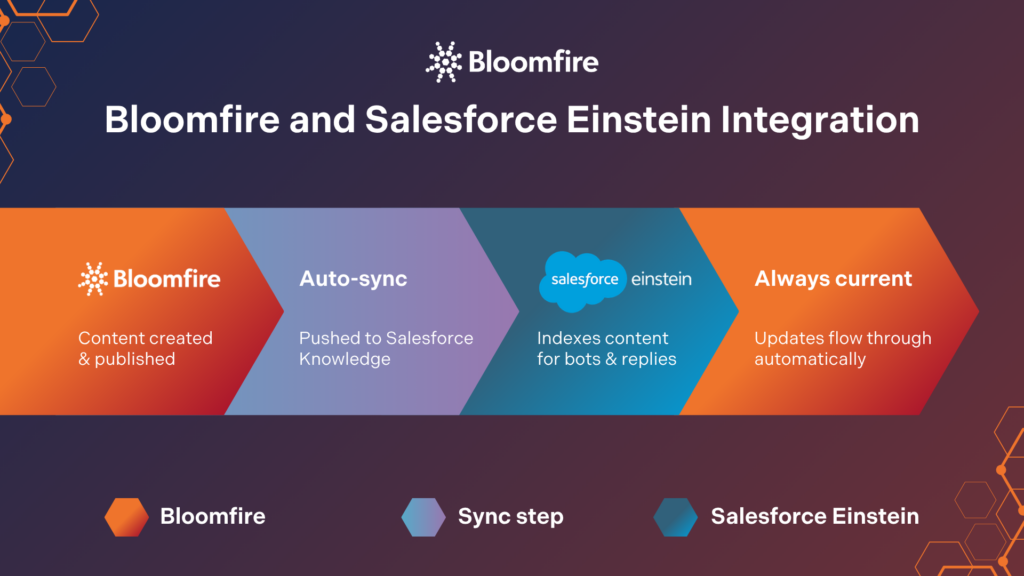
Once connected, Bloomfire becomes the authoring and governance layer while Salesforce Einstein becomes the delivery mechanism inside the CRM. Rather than asking teams to maintain two separate knowledge bases, content is created and kept current in one place and then made available wherever Einstein needs it. In practice, that flow looks like this:
- Content gets created, reviewed, and published inside Bloomfire, where subject matter experts and knowledge managers own it.
- Published Bloomfire posts sync automatically into Salesforce Knowledge, including titles, formatting, tables, and attachments.
- Salesforce Einstein indexes that synced content and makes it available to bots, agent-assist recommendations, and generated replies.
- Updates or removals in Bloomfire flow through automatically, so Einstein is never working from a stale article.
Content moves one direction, from Bloomfire into Salesforce, which keeps a single source of truth intact instead of forcing teams to maintain the same article in two places. You can see this described in more depth in Bloomfire’s data sheet on connecting knowledge to your CRM, along with a video walkthrough of the Salesforce integration if you’d rather see it in action.
Beyond the Einstein connector, Bloomfire also offers a native Salesforce app that puts search and Synapse (Bloomfire’s conversational AI) directly onto any Salesforce object, so reps and agents can pull up relevant content without ever leaving a Case, Opportunity, or Account record.
What this integration looks like in practice
Picture a support agent working a case about a failed password reset. Instead of searching multiple tools or guessing at the right article, Einstein surfaces a recommended knowledge article and drafts a suggested reply, both pulled from content that was authored and kept current in Bloomfire.
A sales rep prepping for a renewal call gets similar treatment: Einstein can suggest relevant battlecards or product updates synced in from Bloomfire, right on the Opportunity record. In both cases, Salesforce Einstein AI features are only doing what they’re designed to do; the difference is that the answers are grounded in knowledge someone actually maintained, rather than whatever happened to get uploaded to Salesforce Knowledge months ago and never touched again.
This kind of knowledge activation is a core part of Enterprise Intelligence: getting the right knowledge into the tools people already use, at the moment they need it, instead of leaving it siloed in a wiki nobody opens.
Real Results: Why Grounding Einstein in Trusted Knowledge Matters
The stakes here aren’t small. McKinsey’s research on generative AI in service operations points to self-service and AI-assisted support cutting incident volume by 40 to 50%, with cost-to-serve dropping more than 20% when the underlying knowledge is solid. 88% of service leaders are prioritizing tech integration specifically to unify data and eliminate silos, because a cohesive knowledge strategy is what determines whether an AI rollout actually works.
That lines up with what Bloomfire has found internally. The financial value of Enterprise Intelligence points to a $27.1 million productivity impact per 100 employees annually when knowledge is centralized and actively surfaced, rather than scattered across systems no one fully trusts. Pair that with Bloomfire’s enterprise AI search capabilities, and the same clean, deep-indexed content that powers internal search is what’s feeding Einstein inside Salesforce. In other words, the return isn’t just faster case resolution in Salesforce; it’s a compounding return on the knowledge work your teams are already doing.
Give Salesforce Einstein Knowledge Worth Acting On
When connecting Salesforce and Bloomfire, organizations get the best of both: Bloomfire handles the authoring, curation, and governance of knowledge, while Salesforce Einstein delivers it exactly where reps and agents are already working. The result is fewer stale answers, less time spent searching, and a customer service and sales experience that actually reflects what your organization knows.
Bring Bloomfire Into Salesforce
Book a personalized demo and see AI-powered answers inside your CRM.
Learn More
No. The Bloomfire-Salesforce connector is designed to move approved Bloomfire content into Salesforce, not the other way around. Any optional features that read Salesforce data, like generating suggested search results, are limited to what’s required for that specific feature and the current user’s permissions, with no background crawling or scheduled data pulls.
Yes. Bloomfire’s native Salesforce app is a modern Lightning component and does not support Salesforce Classic. Organizations already on Lightning, or planning a migration, can install and configure the app on any object in Service Cloud or Sales Cloud.
The fastest path is to talk with the Bloomfire team about your current Salesforce setup and knowledge sources. From there, implementation typically involves connecting Bloomfire to Salesforce Knowledge, confirming which content should sync, and configuring where the Bloomfire widget or Einstein-powered recommendations should appear.
Betsy leads the customer success and implementation teams at Bloomfire and is a Certified Knowledge Manager (CKM) from KM Institute. Passionate about the people side of knowledge engagement and knowledge sharing, she brings real-world experience in tackling the challenges companies face with knowledge management.
How Self-Healing Knowledge Bases Work: A Closer Look Into Bloomfire’s Content Reliability

How Conflicting Content Detection Protects Answer Accuracy
Salesforce Einstein + Bloomfire: Smarter Answers Inside the CRM

Build your knowledge ecosystem
Connect knowledge pools of documents, conversations, media, data, and expertise with your Persistent Semantic Memory™ to ground your AI. Use our turn-key of connectors or build your own to connect to any enterprise systems.

Sign up for Innovation
The pace of innovation with AI is accelerating. Join an alpha group for early access to new turnkey Intelligence Modules, and help shape what comes next.