
From quick questions to company-wide updates, Bloomfire brings your knowledge into the everyday moments where work happens in Slack.
Bloomfire + Slack: Knowledge Where You Work
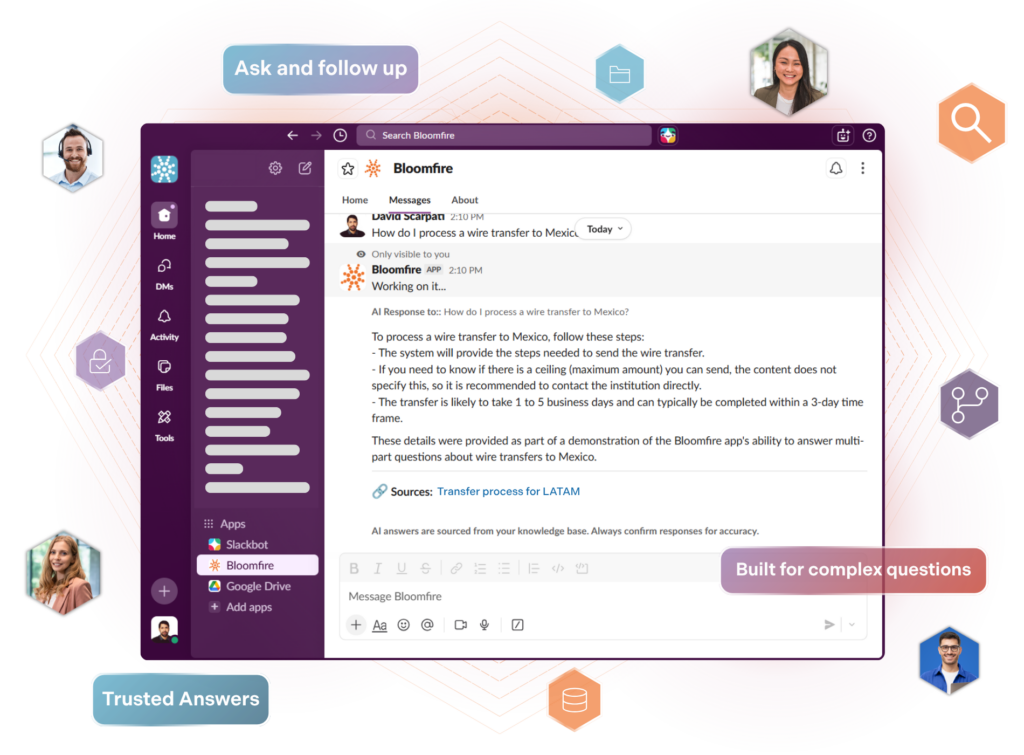
Chat with your company’s knowledge, search, and get verified answers from your organization’s knowledge base without leaving Slack.
Add to SlackWhat you can do with Bloomfire in Slack

Conversational AI, inside Slack
Synapse is a full conversational experience. Ask follow-up questions, get answers grounded in your organization’s knowledge, and share them with your team — all without leaving Slack.

Search Bloomfire from Slack
Use a quick slash command to surface the right content with helpful previews. Scan results, open the source, or share a link into your conversation—no browser shuffle required.

Share Knowledge
From a result or answer, share to a channel or DM so everyone sees the same source of truth in context.

Get Notified
Bring Bloomfire activity into the channels your team already watches. See new posts, updates, and questions at a glance, then jump to the source to read or respond.
Admins can now highlight what matters most with configurable group-level notifications to keep specific teams and initiatives in the loop.
Connect Slack and Bloomfire
Start sharing and capturing knowledge in Slack in just a few simple steps.
01 – Install
From the Slack App Directory, install the Bloomfire app for your workspace. Open Bloomfire under Apps in Slack and click Start setup.
02 – Choose Community
Enter the URL of the Bloomfire community you want to connect. This becomes the default place Slack uses to search and answer questions.
03 – Authorize
Click Authorize Bloomfire to let Slack securely access that community. You’ll be taken to Bloomfire to review and confirm permissions.
04 – Confirm
You’ll see a confirmation message in Slack once everything’s connected. You can now ask AI, search Bloomfire, and share answers without leaving Slack.
Resources & Support
From setup to best practices, these resources help you connect Bloomfire to Slack and use it with confidence.
Install & Connect Guide
Step-by-step instructions to install Bloomfire in Slack and connect it to your knowledge base in minutes.
Learn MoreUsing Bloomfire in Slack
Learn how to ask questions, search content, and share trusted answers directly in your Slack conversations.
Learn MoreTips & Troubleshooting
Quick tips and answers to common questions to help you get the most out of Bloomfire in Slack.
Learn More
Estimate the Value of Your Knowledge Assets
Use this calculator to see how enterprise intelligence can impact your bottom line. Choose areas of focus, and see tailored calculations that will give you a tangible ROI.

Take a self guided Tour
See Bloomfire in action across several potential configurations. Imagine the potential of your team when they stop searching and start finding critical knowledge.