
MCP Server Explained: A Guide to Its Revolutionary Function

Summary: Model context protocol (MCP) is an open standard that lets AI assistants and agents securely connect to external tools and data sources through a consistent interface.
The model context protocol (MCP) provides a standardized method to connect artificial intelligence (AI) assistants to databases and enterprise systems without building custom integrations for each data source. Below, we explain how MCP servers work, their core architecture, and how developers can implement context-aware AI applications with speed.
What Does MCP Stand For in AI Systems?
MCP defines a universal method for AI agents to connect with external tools, data sources, and systems (e.g., internal knowledge management systems, business intelligence platforms, and enterprise search tools). The protocol addresses what developers call the M x N problem. Each AI model previously required custom integrations for every data source it accessed. MCP replaces this fragmented approach with a build-once model that any MCP-compatible agent can use.
The protocol operates on JSON-RPC 2.0 (JavaScript Object Notation-remote procedure call) and creates a common language that large language models (LLMs) use to request data or trigger actions from external services. This standardized communication layer enables conversational AI assistants to extend beyond their training data to code repositories, databases, and cloud services in real time.
What Problem Does the MCP Solve?
Anthropic describes MCP as USB-C for AI applications. USB-C standardized device connectivity and eliminated proprietary cables, acting like a universal remote. MCP standardizes AI-tool connectivity in the same way. Before this protocol, every AI platform implemented the tool calling differently. For example, OpenAI used JSON schemas, while Claude used tool use blocks.
The universal remote analogy strikes a chord in the same way. A smart home universal remote consolidates control of lights, thermostats, and cameras into a single interface. MCP provides this same centralized control. One AI agent can access multiple data sources through a single protocol rather than managing separate connectors for each system.
AI That Knows Your Business
Turn scattered documents into one AI assistant employees can actually trust.
Discover How It Works
What Are the MCP Components?
MCP follows a client-server architecture with three roles: the host, client, and server. In a nutshell, the host represents the AI-facing application; the client lives inside the host and manages protocol communication; and the server exposes capabilities to any connected client. Below, you’ll learn how these three roles form the foundation of the core MCP architecture.
MCP host, client, and server roles explained
The MCP host contains the LLM within an AI application where users interact, whereas the MCP client translates LLM requests into protocol messages on this host and converts server responses back into the model’s format. Each client maintains a dedicated one-to-one connection with its corresponding MCP server. The MCP server operates as an external service that provides context, data, or capabilities to the LLM.
To name just one example, Visual Studio Code acts as a host. The runtime instantiates a client object that maintains that connection when connecting to the Sentry MCP server. Connecting to another server, such as the local filesystem server, creates an additional client.

How MCP servers bridge AI models and external tools
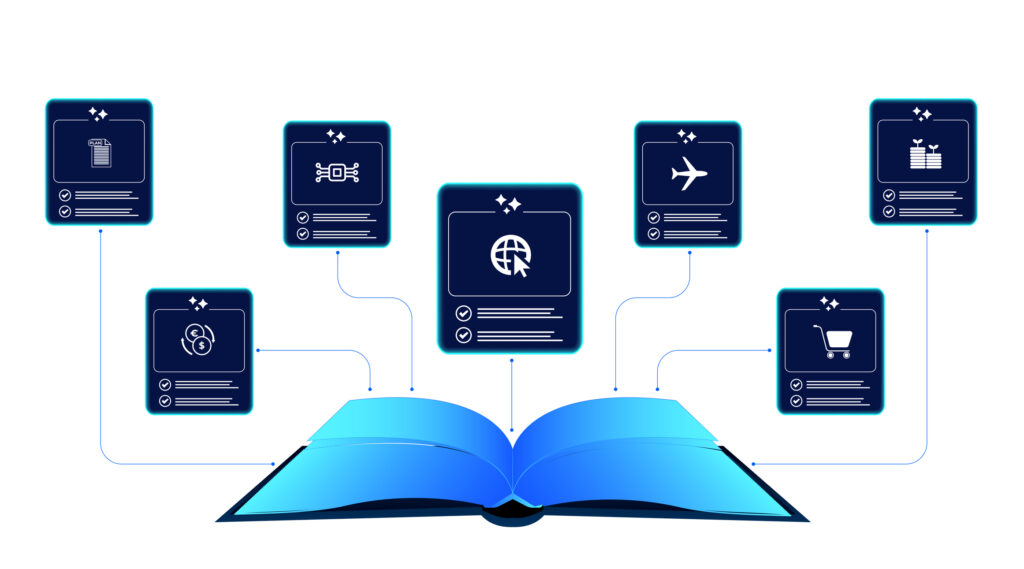
MCP servers expose an application’s functionality to an AI agent in a structured, predictable way. Each of the following MCP servers declares its offerings through three primitives:
- Tools: Executable functions the agent calls to take action, such as searching the web or running a query
- Resources: Read-only data the agent accesses, including files, application programming interfaces (API) responses, or database snapshots
- Prompts: Templates that guide how the agent uses tools or workflows to ensure consistent behavior
MCP servers act as adapters, translating complex underlying systems into a standardized format that any AI client can use. For instance, a Google Drive server might offer read_file() and list_documents(), while a database server provides execute_query() and retrieve_data(). This abstraction layer sits on top of existing APIs. Developers can write integrations once and reuse them across multiple AI applications.
Data Flow in the MCP Architecture
MCP relies on structured messaging and dynamic discovery mechanisms that let clients understand what capabilities a server offers without hardcoding assumptions. The two sections below break down how this works in practice.
1. Request-response cycle with structured JSON
MCP implements JSON-RPC 2.0 for all client-server communication. The protocol defines three message types: requests containing a method and parameters with unique IDs; responses returning results or errors that match request IDs; and notifications sent one-way without expecting replies. Each request must include all necessary information, as the protocol remains stateless.
2. Dynamic tool discovery and metadata exchange
Connection initialization involves capability negotiation through protocol version exchange and feature declarations. Clients send tools/list requests to find available capabilities. Servers respond with detailed metadata arrays that contain tool names, descriptions, and JSON Schema input definitions. Servers emit notifications/tools/list_changed messages when tool availability changes, prompting clients to refresh their tool inventory.
Stateful sessions vs. stateless API calls
MCP supports stateful sessions through the Streamable HTTP transport. Servers assign session IDs during initialization via MCP-Session-Id headers. Clients include this identifier in subsequent requests, allowing servers to maintain context across interactions. Stateful servers retain client-specific data, enabling conversation history and progress tracking. Stateless interactions treat each request independently.
Transport options: local stdio vs. remote HTTP
MCP defines two standard transports. Stdio uses standard input/output streams for local process communication, providing optimal performance without network overhead. The client launches the server as a subprocess and exchanges newline-delimited JSON-RPC messages. Streamable HTTP enables remote server communication through HTTP POST for client messages, with optional Server-Sent Events for streaming. Remote servers offer greater flexibility and scalability, supporting multiple concurrent clients.
Setting Up Context-Aware AI Applications With MCP
Getting a context-aware application off the ground involves a handful of interconnected steps. Instead of writing custom integration code for every API or database an assistant needs to reach, teams can build a single MCP server that exposes those capabilities through a consistent interface. Each section builds on the last, so following them in order gives you a working, secure foundation before you move on to more advanced features.

1. Installing required SDKs and dependencies
Context-aware applications need environment configuration first. The Python SDK (software development kit) requires version 3.10 or higher. Developers install the MCP package using pip install “mcp[cli]==2.0.0b1” to get pre-release versions. Version pinning is recommended during the beta phase. The same package supports both server and client implementations, eliminating the need for separate installations for different roles.
2. Registering tools and defining input-output schemas
Tool registration happens through decorator-based definitions. Each tool requires a unique name, a functional description, and an input schema that follows the JSON Schema standard.
Type-hinted Python functions generate schemas without manual JSON construction. For instance, a function with parameters a: int, b: int creates the corresponding schema on its own. Servers respond to tools/list requests with complete metadata, including tool names, descriptions, and input specifications.
3. Implementing authentication and access control
Modern MCP specifications designate servers as OAuth 2.1 resource servers. Authentication flows through external identity providers like Keycloak. These providers handle user login and token issuance. Servers confirm access tokens by checking signature, expiry, issuer, and scopes before tools execute. Granular scope definitions enforce least privilege. Separate scopes like email.send and contacts.read limit actions to granted permissions. Token audience verification prevents replay attacks across different servers.
4. Adding error handling and observability
Structured logging captures tool invocations with user identity, timestamps, and parameters. Servers log every request, tool execution, and external API call to reconstruct incidents. Up-to-the-minute metrics track request counts, error rates, and latency distributions per tool. Observability platforms monitor session establishment success rates, connection stability, and protocol compliance.
MCP Server Benefits Over Traditional API Integration
As AI agents become embedded in more business workflows, the way they connect to data and tools matters as much as the models themselves. MCP offers a different approach than traditional point-to-point API integrations, one built for scale, reuse, and security from the ground up. The following benefits illustrate why organizations are rethinking their integration architecture around MCP.
1. Eliminating custom connectors for each data source
Traditional API integration patterns create exponential complexity. Connecting five applications to ten services requires fifty custom integrations. MCP solves this multiplication problem through hub-and-spoke architecture and reduces the same scenario to fifteen components.
The protocol wraps existing APIs with a standardized layer. AI models can find and use capabilities without writing custom code for each connection. Self-describing tools eliminate separate documentation. The interface becomes the documentation.
2. Reusable server logic for multiple AI clients
MCP servers expose capabilities once and make them available to Claude, GPT-4 (generative pre-trained transformer 4), Gemini, and any compliant agent without modification. Developers implement business logic in a single location rather than duplicating it in custom integrations. Changes to authentication, validation, or rate limiting propagate to all consuming clients. Teams can iterate, test, and deploy independently with this modularity.
3. Built-in security, rate limiting, and audit logging
The protocol enforces consistent authentication and authorization patterns that simplify security management. Rate limiting operates at multiple levels, from gateway-wide policies to per-tool restrictions. Expensive operations receive tighter limits via CEL (Common Expression Language) expressions that inspect request bodies and apply different ceilings for each tool name. Audit trails log every tool invocation with user identity, timestamps, parameters, and result metadata.
These advantages compound over time. What starts as a simpler integration path becomes a foundation that scales with an organization’s AI ambitions. Teams that adopt MCP early avoid the technical debt of maintaining dozens of point-to-point connections, and they gain the flexibility to swap in new AI models as the landscape evolves.
Connect AI to Your Business Tools Using MCP Servers
MCP servers represent a fundamental change in how developers build context-aware AI applications. The protocol standardizes client-server architecture and enables AI models to access databases, APIs, and enterprise systems without custom connectors for each source. If you integrate an MCP server into these systems, you get reusable server logic, consistent security patterns, and easier maintenance across multiple AI clients.
Is Your Knowledge Living in Silos?
Bring every team’s expertise into one hub built for how people actually work.
Build Your Knowledge Hub
A regular API requires custom client code to know its specific endpoints, parameters, and authentication scheme. MCP standardizes this into self-describing tools that any AI client can discover and call without bespoke integration work.
An MCP server exposes specific tools, data, or capabilities in a standardized, self-describing way so AI models can discover and use them without custom integration code. A cloud server, by contrast, is general-purpose remote computing infrastructure (such as an AWS EC2 instance) that can run any application or workload. It doesn’t inherently include any AI-specific protocol, standardized tool discovery, or model-facing interface unless you build one on top of it.
For general-purpose cloud/serverless hosting, teams commonly turn to Vercel, Render, and Cloudflare for quick, low-maintenance MCP server deployment. On the other hand, enterprises that need full lifecycle management (deploy, registry, gateway, governance) often use platforms such as Prefect Horizon or Kong’s AI Gateway. Dedicated hosted-MCP platforms such as Composio, Nango, and MCPBundles are also popular when teams want managed auth, credential handling, and tool routing without building that infrastructure themselves.
Security depends on implementation, but the protocol supports OAuth-based authentication, permission-aware access controls, and audit logging. That said, research has found many public MCP servers with weak or missing authentication, so vetting a server’s security posture matters as much as the protocol itself.
As an end user, no, connecting to an MCP server in a tool like Claude usually just requires an admin to add the connector through settings. Building an MCP server, on the other hand, does require development work, though official SDKs in TypeScript and Python make it a relatively lightweight lift for engineers.
How Self-Healing Knowledge Bases Work: A Closer Look Into Bloomfire’s Content Reliability

How Conflicting Content Detection Protects Answer Accuracy

Salesforce Einstein + Bloomfire: Smarter Answers Inside the CRM

Build your knowledge ecosystem
Connect knowledge pools of documents, conversations, media, data, and expertise with your Persistent Semantic Memory™ to ground your AI. Use our turn-key of connectors or build your own to connect to any enterprise systems.

Sign up for Innovation
The pace of innovation with AI is accelerating. Join an alpha group for early access to new turnkey Intelligence Modules, and help shape what comes next.