
How to Write a Knowledge Base Article (+ Examples and Templates

Creating a well-structured knowledge base article involves more than just jotting down information. It requires an understanding of your audience, clarity in communication, and a knack for presenting information concisely. Your goal is to empower users with the knowledge they need to resolve their issues independently.
In this guide, you’ll explore how to write knowledge base articles that effectively communicate solutions while maintaining reader interest. Additionally, you’ll gain insights into structuring articles, learn from engaging examples, and get more tips to streamline your writing process.
What Are The Key Elements of a Good Knowledge Base Article?
Before you craft a knowledge base article, it’s essential to understand the foundational elements that contribute to its success. These elements, encompassing clarity, structure, and searchability, work together to ensure readers can quickly find, understand, and act on the information they need.
- Clarity: Use straightforward language and avoid complex sentences that could confuse your readers.
- Structure: A well-organized article typically includes a clear title, a concise introduction, step-by-step instructions, and a conclusion. This format not only enhances readability but also ensures that users can quickly locate the information they are seeking.
- Searchability: Use relevant keywords that your audience is likely to search for, and ensure that your article is optimized for AI search and contextual discovery.
The elements of a good knowledge base article are more essential than ever, as 75% of knowledge workers globally rely on generative AI for immediate information. With generative AI, the answer you get is only as good as the content found in your knowledge base–most of which is from KB articles. Ensure that you include these elements in your writing protocol and incorporate them in the steps discussed below.
How to Write Effective Knowledge Base Articles
Writing a knowledge base article involves the basic process that experts typically follow when detailing instructions or forming a relevant discussion around a topic. Overarching the need for a clear structure is the perception of being intentional with the overall takeaway or the key action you wish to catalyze when certain users finish reading the article.
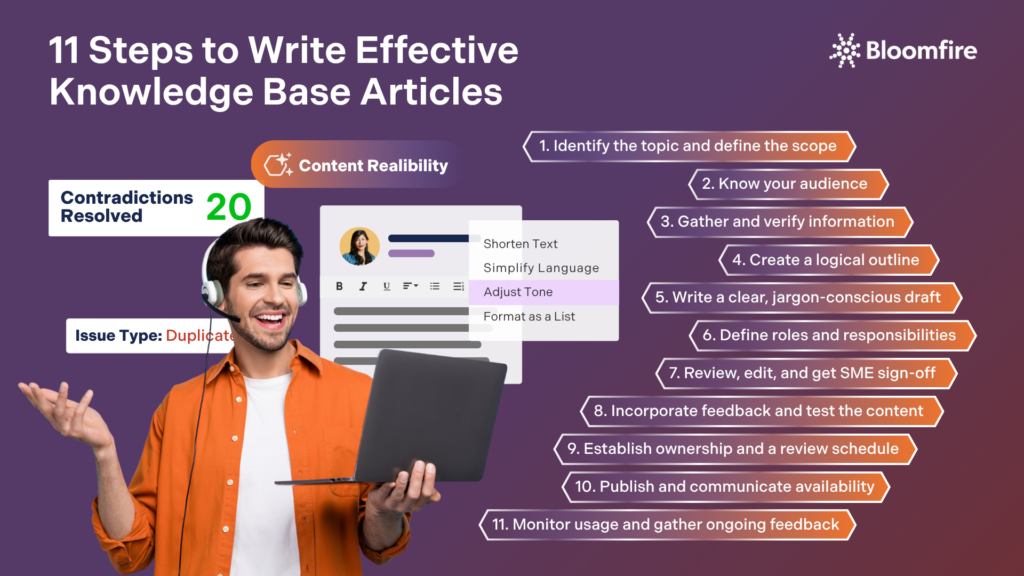
To ensure your KB or help center article fulfills its purpose, consider these steps to understand how to write knowledge base articles:
1. Identify the topic and define the scope
Highlight the specific problem, question, or process the article will address. For internal knowledge bases, this often means consulting with team leads, support tickets, or recurring employee questions to determine what truly needs documentation. Define the article’s boundaries early, such as what it will and won’t cover, to avoid bloat and keep it focused.
2. Know your audience
Before writing a single word, determine who will be reading the article. An information technology (IT) runbook for system administrators looks different from an onboarding guide for new hires. Consider the reader’s technical proficiency, their role within the organization, and what they need to do after reading the article.
3. Gather and verify information
Regardless if you’re a subject matter expert (SMEs) writing the article or someone curating the information for a guide, conducting a thorough research and verification process must be part of your writing workflow. Consult other SMEs, review internal and system documentation, and reach out to process owners. Accuracy is critical as outdated or incorrect information can lead to costly mistakes. Have an expert or someone in authority validate the content before publishing.
4. Create a logical outline
Organize your content so it flows naturally from context → steps → outcome. Readers in a workplace setting or other stakeholders often seek a specific answer quickly, so the structure should support skimming. Well-structured sections allow employees to scan and jump directly to the part they need, critical in a busy workplace where no one reads linearly from top to bottom.
5. Write a clear, jargon-conscious draft
Write in plain, direct language. While some internal terminology is expected and appropriate, avoid unnecessary acronyms or buzzwords without explanation. Use active voice, numbered steps for processes, and bullet points for lists of options or requirements.
6. Define roles and responsibilities
Where it’s relevant, specify who is responsible for each step or action. Internal articles often document processes that span multiple departments, so clearly noting “the IT Admin should…” or “this is handled by the HR Business Partner” prevents confusion and dropped handoffs.
7. Review, edit, and get SME sign-off
Review the draft for grammar, clarity, and logical flow. Then route it through an approval process that usually includes a technical reviewer (for accuracy), an editor or team lead (for clarity), and a compliance or legal review if the content involves regulated processes or sensitive data.
8. Incorporate feedback and test the content
Where it’s possible, have a real end-user test the article by following its instructions from scratch. This surfaces gaps, ambiguous steps, or missing context that the original author may have overlooked due to familiarity with the subject.
9. Establish ownership and a review schedule
Every internal article should have a named owner responsible for keeping it up to date. Set a recurring review cadence (e.g., quarterly or annually) and note the last-reviewed date prominently in the article. Stale documentation is one of the most common and damaging knowledge base problems in organizations.
10. Publish and communicate availability
Once approved, publish the article and actively notify the relevant teams or departments. Don’t rely on employees to stumble upon it. Share it via Slack, email, onboarding checklists, or link it from related tools and systems. You may skip this step if you’re using a knowledge management system like Bloomfire, which automatically notifies your organization of newly uploaded content across multiple channels, making knowledge awareness seamless and deliberate.
11. Monitor usage and gather ongoing feedback
Track article views, search queries that lead to it, and any “was this helpful?” ratings if your platform supports them. Treat the article as a living document. Update it as processes change, systems are updated, or new edge cases emerge.
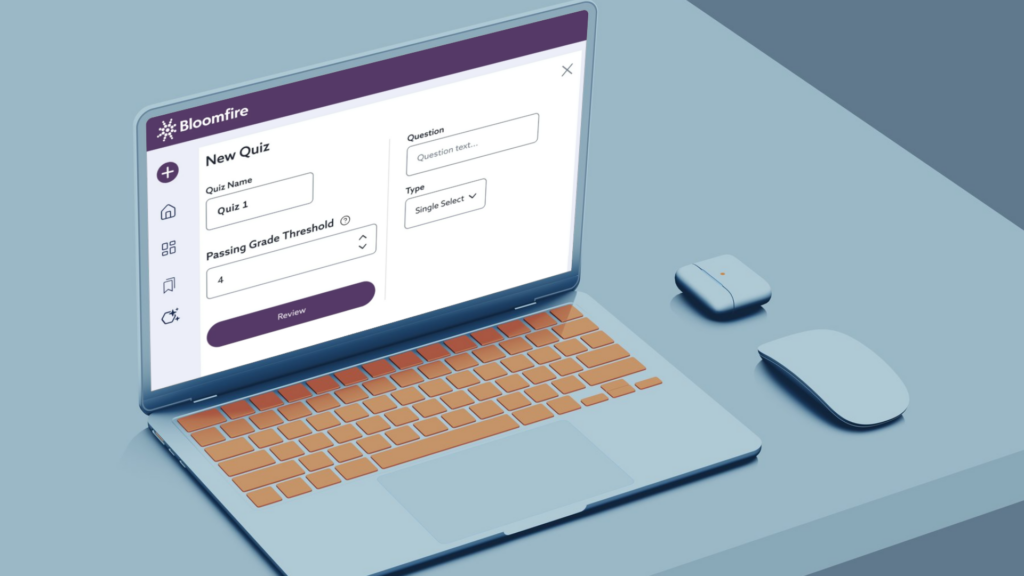
Bloomfire takes knowledge confirmation to the next level. With its Learn and Confirm Knowledge Checks, employees and stakeholders can assess their comprehension of your knowledge base articles. Gain the confidence that consistent information, data, and insights are not just absorbed, but reinforced and acted on.
How to Structure a Knowledge Base Article: Best Practices
Going through multiple documents in a day is already hard enough without having those documents contain walls of text and/or lacking a logical flow. Research suggests that multiple stimuli at work, including unorganized information, can trigger cognitive overload. This is why ensuring that knowledge base articles are digestible, highly valuable, and easy to follow must be non-negotiable.
Reinforce ease and comfort among your target readers by structuring knowledge base articles in the following ways:
- Write a clear and descriptive title: The title should accurately and specifically reflect the article’s content. Avoid vague titles like “System Issue.” Instead, use something like “How to Reset Your SSO Password in Okta.” Consider adopting a consistent title format across all articles (e.g., “How to…”, “Troubleshooting…”, “Policy: …”) so employees can immediately recognize the article type.
- Include article metadata: Before the body of the article, include key metadata such as the article owner, last reviewed date, applicable department or team, software version (if relevant), and related policies or compliance references. This is especially important in enterprise environments where processes change frequently, as employees need to trust that what they’re reading is current and authoritative.
- Write a concise introduction: Open with a brief overview of what the article covers, the problem or question it addresses, and who it’s intended for. In an organizational context, this helps employees quickly confirm they’re in the right place before investing time reading further.
- Break content into logical, headed sections: Divide the body of the article into clearly labeled sections using headings and subheadings. Each section should address one distinct aspect of the topic.
- Use step-by-step numbered instructions for processes: When documenting a procedure, workflow, or technical process, use numbered steps rather than paragraphs. Each step should represent a single, discrete action. Avoid combining multiple actions into a single step, as this increases the likelihood that a reader will miss something.
- Incorporate visual aids: Screenshots, diagrams, flowcharts, and annotated images can dramatically improve comprehension, especially for technical processes or multi-system workflows. Visuals help bridge the gap between written instructions and the actual interface.
- Use tables for comparisons, settings, or reference data: Tables are highly effective for presenting structured information such as user role permissions, configuration settings, pricing tiers, or process ownership across departments. They allow readers to quickly scan and compare data without parsing dense paragraphs.
- Use callout boxes for warnings, notes, and tips: Highlight critical information, such as warnings about irreversible actions, compliance requirements, or helpful shortcuts, using visually distinct callout boxes or formatted notes. Labels like ⚠️ Warning, ???? Note, or ???? Tip draw the reader’s attention to information they should not overlook.
- Conclude with a summary or next steps: Close the article with a brief summary of what was covered and a clear call to action or logical next step. This might be a link to a related article, a prompt to submit a request form, or a reminder to contact a specific team if further assistance is needed. A strong conclusion prevents the reader from feeling stranded at the end of the article.
When your KB articles are well-structured, the likelihood that employees will engage with the entire document increases. It also helps to lay out your content in a way that is consistent with your brand. Consider incorporating your brand colors, logo, and other elements to take ownership and keep your articles and documents professional-looking.
Knowledge Base Article Examples and Templates (Based on Type)
When creating a protocol on how to write a knowledge base article, uniformity in the style guide is observed. However, certain formatting choices may vary by category to which the KB articles belong. Below are several types of KB articles, each with a breakdown of what they should include and downloadable knowledge base article templates.
1. How-to/process articles
How-to articles walk employees through completing a specific task or following an established process from start to finish. They are among the most common article types in an internal knowledge base and should be written with enough detail that an employee with no prior experience can complete the task independently.
Open with a one-paragraph introduction explaining when and why an employee would need to submit a purchase request. For example, when procuring software, services, or equipment above a certain dollar threshold.
It would then list prerequisites, such as having an active Coupa account and manager approval, before walking the reader through each step with numbered instructions and annotated screenshots. A notes section might clarify that requests over $10,000 require a second-level approval, and the article would close with a link to the Procurement team’s Slack channel for follow-up questions.
2. Troubleshooting articles
Troubleshooting articles help employees diagnose and resolve specific problems or errors. They are typically organized around symptoms, or what the employee is experiencing, and lead them toward a resolution through a logical sequence of checks or fixes.
Your knowledge base article would begin by describing the symptoms an employee might encounter, such as being unable to connect to the virtual private network (VPN), receiving a specific error code, or experiencing repeated disconnections. It would then present a tiered troubleshooting sequence, starting with the simplest fixes (restarting the VPN client, checking internet connectivity) and progressing to more advanced steps (reinstalling the client, checking firewall settings).
A table might map common error codes to their most likely causes and recommended fixes. The article would conclude with instructions for submitting an IT support ticket if the issue remains unresolved, including what diagnostic information to attach.
3. Policy and compliance articles
Policy articles document organizational rules, standards, and requirements that employees are expected to follow. In enterprise environments, these articles often carry compliance or legal weight, so accuracy, version control, and clear ownership are especially critical.
This KB article would open with a brief statement of purpose that explains why the policy exists and who it applies to (e.g., all full-time employees, contractors, and vendors with company-issued hardware). The body would be organized into clearly headed sections covering permitted uses, prohibited activities, data handling requirements, and consequences for policy violations.
A callout box might highlight a critical reminder, such as “Personal use of company devices for cryptocurrency mining is strictly prohibited and may result in immediate termination.” The article would note the policy owner, the last review date, and include a link to the formally signed policy document stored in the company’s legal repository.
4. Onboarding and getting started articles
Onboarding articles are designed to help new employees or users get up to speed quickly with a system, tool, process, or role. These documents prioritize orientation and foundational knowledge over deep technical detail, and they often link out to more advanced articles for readers who need to go further. It’s a staple of a strong, structured onboarding process that improves new-hire retention.
A welcome message and a brief overview of how Salesforce fits into the organization’s sales workflow would be a good way to start this article. It would then walk new reps through the essential first steps: logging in for the first time, navigating the dashboard, understanding the difference between leads and contacts, and logging their first activity.
Each section would include screenshots of the actual interface along with callout tips from experienced team members. The article would conclude with a curated list of next-step articles (e.g., “How to Create a New Opportunity,” “Understanding Pipeline Stages”) and a pointer to the Sales Enablement team for live training sessions.
5. Feature release and product update articles
These articles inform internal teams, such as customer support, sales, or operations, about new features, system changes, or product updates. They are especially important in organizations that use internally developed tools or frequently updated software-as-a-service (SaaS) platforms, as teams need to stay aligned on what has changed and how to communicate it.
Start with a brief summary of what changed and why. For instance, the finance team has enabled automated three-way invoice matching to reduce manual reconciliation time. It would highlight the key benefits (faster processing, fewer errors, reduced manual workload) before walking accounts payable staff through what is different in their day-to-day workflow.
A side-by-side comparison table might illustrate the old and new processes. The article would also address common concerns proactively, such as what happens when a mismatch is detected, and include a link to submit feedback or flag issues during the rollout period.
6. Reference and glossary articles
Reference articles serve as a centralized source of truth for definitions, standards, codes, configurations, and data that employees regularly need to look up. They are not instructional in nature. Instead, their purpose is to be quickly scannable and reliably accurate.
This article would present an alphabetically organized table of commonly used HR terms, acronyms, and their definitions, covering everything from “FLSA (Fair Labor Standards Act)” to “PIP (Performance Improvement Plan)” to “HRBP (HR Business Partner).”
Each entry would include a plain-language definition and, where applicable, a link to a related policy or process article. The article would be owned by the HR Operations team and reviewed quarterly to ensure new terminology is captured and outdated terms are retired.
7. FAQ articles
Frequently Asked Questions (FAQ) articles consolidate the most frequently asked questions about a topic, system, or process into a single, easy-to-navigate resource. They are particularly effective for reducing repetitive support requests and empowering employees to self-serve.
Organized as a series of questions and answers, this KB article is grouped into logical categories, including Eligibility, Plan Options, Dependents, and Deadlines. The answers would be concise but complete, with links to deeper resources where needed (e.g., “For a full comparison of health plan options, see the Benefits Comparison Chart”).
A prominent callout at the top would note the open enrollment window dates and who to contact for personalized assistance. The article would be updated annually before each enrollment period and archived afterward for reference.
Adopting the right structure for each specific article type ensures that complex information remains accessible and user-friendly. Organizations allocating 10% to 50% of their efforts to content design are 33% more likely to achieve their performance goals than those that treat content as unstructured text. In a troubleshooting guide or a technical FAQ, tailoring the layout to the content’s purpose maximizes the utility of your internal documentation. Use these sample templates to streamline your content creation process.
Streamline Knowledge Base Article Creation
Organizations that prioritize standardized knowledge base article creation often see significant reductions in repetitive support tickets, employee downtime, and onboarding issues. Adopting clear templates and automated approvals enables subject matter experts to document their insights without getting bogged down in formatting. Invest in an intelligent knowledge base with a dynamic engine and authoring tools to simplify your writing workflow.
Write KB Articles With Smart Tools
Create clear, consistent, high-quality KB articles faster using Bloomfire’s AI authoring suite.
Explore Bloomfire’s AI Author Assist
Knowledge base articles are typically written by subject matter experts, technical writers, support agents, or team leads who have direct experience with the topic. The best articles combine deep expertise with clear, user-friendly language so the content is both accurate and accessible.
Each article should have a named subject matter expert (SME) responsible for verifying technical accuracy, alongside a team lead, manager, or documentation owner who approves it for publication. For articles that touch on compliance, legal, HR policy, or security, an additional sign-off from the relevant department or legal counsel is strongly recommended before the article goes live.
Use the exact words and phrases employees are likely to type when searching, including common abbreviations, system names, and error messages, naturally throughout the title, introduction, and headers. Most internal knowledge base platforms also support metadata fields like tags, categories, and article summaries, all of which should be filled out consistently to improve search ranking and filtering.
In knowledge management, categories are broad, hierarchical groupings that define where an article lives within the overall structure of the knowledge base, such as IT, HR, or Finance. On the other hand, tags are flexible, flat keywords that describe the specific topics, tools, or concepts an article covers. Categories help users browse and navigate the KB, whereas tags improve search discoverability and allow a single article to surface across multiple relevant queries.
A standard review cadence of every three to six months works well for most operational and technical content, while policy documents and compliance-related articles should be reviewed at least annually or whenever a relevant regulation or internal policy changes.
The key is to define technical terms in-line the first time they appear so readers build understanding without feeling talked down to. Writing in plain, active language with concrete examples and real-world context keeps content accessible while preserving the accuracy and depth that make the article genuinely useful.

Why Are Your AI Agents Only as Good as Your Knowledge Base?
How Does Bloomfire Improve Knowledge Retention?
How Self-Healing Knowledge Bases Work: A Closer Look Into Bloomfire’s Content Reliability

Estimate the Value of Your Knowledge Assets
Use this calculator to see how enterprise intelligence can impact your bottom line. Choose areas of focus, and see tailored calculations that will give you a tangible ROI.

Take a self guided Tour
See Bloomfire in action across several potential configurations. Imagine the potential of your team when they stop searching and start finding critical knowledge.