
What Is a Knowledge Base Article?

A knowledge base article is a structured, self-contained piece of documentation designed to help users solve specific problems independently. It answers questions people often ask or provides instructions for solving common problems.
Understanding what a KB article is and how to create effective ones matters for any organization looking to improve employee productivity and customer satisfaction. You’ll find the core components of knowledge base articles in this piece, explore different types, and learn best practices for maintaining content that serves your audience.
What Is the Difference Between an External and an Internal Knowledge Base Article?
Knowledge base articles serve two distinct audiences with different access requirements and content types: external and internal. The main difference between these KB articles is the audience they serve.
External KB articles
External knowledge base articles target customers and end users through public-facing channels such as help centers and support portals. Login credentials aren’t needed to access these resources, which contain troubleshooting guides, how-to instructions, and FAQs about products or services. External knowledge bases function as self-service options, especially as 81% of users attempt to resolve issues on their own before contacting support.
Internal KB articles
Internal knowledge base articles are intended only for employees and support teams. These require authentication to access and contain sensitive information, such as standard operating procedures, detailed runbooks, and provisioning instructions, which shouldn’t be shared with external audiences. IT teams might use internal articles to document virtual private network (VPN) reset procedures, while customer-facing articles explain simple connectivity troubleshooting.
Understanding these distinctions ensures that information is categorized effectively to protect organizational privacy while maximizing user accessibility. This strategic separation allows a company to provide a helpful public presence without compromising the complex, sensitive workflows required for internal technical maintenance.
How KB Articles Differ From Regular Documentation
Knowledge base articles take a reactive approach to content creation, addressing problems users encounter. This content develops based on customer questions and support ticket patterns. Regular product documentation follows a proactive model, created upfront as complete reference material covering all technical details.
Knowledge base content focuses on problem-solving with specific workarounds and troubleshooting steps. Documentation provides technical coverage that developers and advanced users need for deep system understanding, and there’s more to it. KB articles answer “How do I fix this?” while documentation answers “How does this work?“
What makes KB articles effective?
Effective knowledge base articles maintain a sharp focus on solving one specific problem or explaining a single task. Articles should be short enough to fit above the fold without scrolling. This constraint forces clarity and eliminates unnecessary information.
Articles need scannable structures with headers and lists that make it easy to locate information quickly. Write in the user’s language rather than industry jargon and make technical concepts available. Frame problems as users would describe them: “Printer not working” instead of “Error code 330219“.
What Are the Types of Knowledge Base Articles?
Your organization needs different knowledge base article types to address varied user needs and scenarios. Selecting the right format will give information or data to users in the most helpful structure.
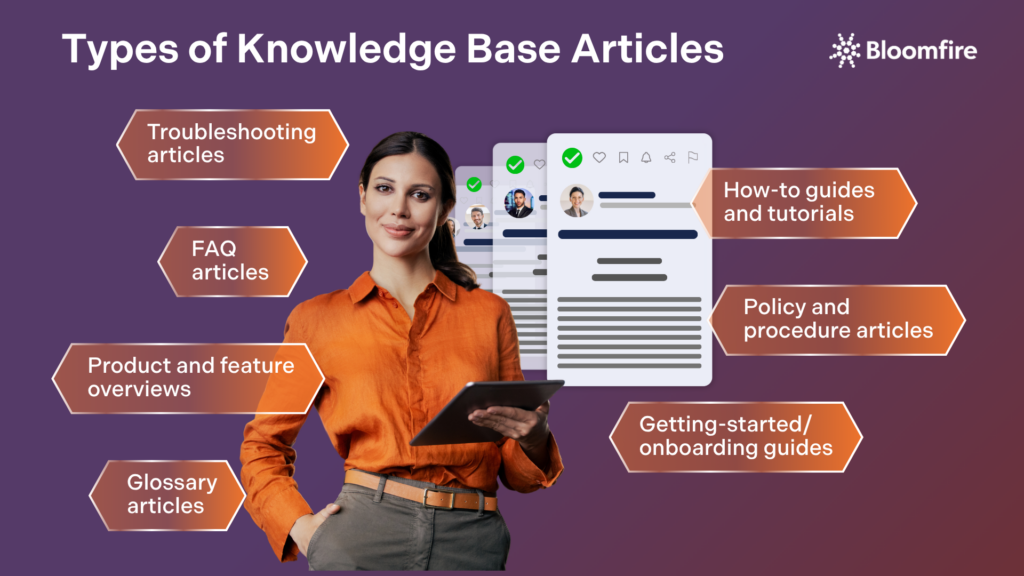
Consider these common types of KB articles:
- Troubleshooting articles address specific issues users experience and provide steps to resolve them. They focus on a single problem with multiple solution pathways designed to fix the same error. Frame titles around problem scenarios, such as “What to do if payment fails,” rather than technical codes.
- How-to guides and tutorials deliver step-by-step instructions for completing specific tasks. They walk users through processes like password resets or adding new team members. Structure these as numbered lists, with one feature or task per item.
- Frequently Asked Questions (FAQ) articles compile common questions around specific product areas using customer language. Group related questions under topic sections, such as shipping timelines or order tracking, to make question scanning easier and reduce friction for readers who need quick answers.
- Policy and procedure articles serve as your single source of truth for organizational guidelines. They include HR policies, security standards, and compliance requirements that employees and stakeholders need to reference.
- Product and feature overviews educate users on system capabilities without diving into technical details. They provide snapshots of available options and functionality.
- Getting-started guides support onboarding by walking new users or employees through the setup process and the first-week essentials.
- Glossary articles define specialized terms and industry jargon. They ensure clarity and consistent terminology in your domain.
72% of organizations globally have now adopted centralized knowledge-sharing systems to boost both internal collaboration and customer engagement. This is why it’s more imperative to provide KB articles in diverse formats to enable organizations to deliver precisely the right level of detail for any given situation. Clear categorization allows users to navigate seamlessly between high-level overviews and granular technical instructions.
What Are the Essential Components of a Knowledge Base Article?
Every knowledge base article requires specific structural elements to deliver value to users. They work together to create content that’s discoverable, understandable, and actionable. The following are components that should be included in a knowledge base article.

1. Title and metadata
Your title determines whether users click on your article. Clear, keyword-rich titles that match how people describe problems work best. In IT knowledge base articles, for instance, “How to Reset Your Password” outperforms vague alternatives like “Password Management.” Keywords should include relevant search terms that your users type.
Consider the language they use, not exclusive terminology. Meta tags enable inclusive search by containing information about the page that users can search by but don’t see. To cite an instance, you might add “email” as a meta tag to an article about “bmail” since that word doesn’t appear in the content.
2. Problem statement and context
A specific, evidence-based description of the issue your article addresses should come first. Your problem statement should identify what isn’t working and provide a brief context. One or two sentences that tell users what the article covers will suffice. Any prerequisites users need, like admin access, should be stated upfront to save time.
3. Step-by-step solution
Steps should be numbered and written in imperative voice: “Click Settings” rather than “Settings can be clicked“. Instructions should be arranged and assume users have limited product knowledge. The buttons or menu items to select should be included. The details must be correct before moving forward, as shown in complete examples.
4. Visual elements and formatting
Screenshots reduce misinterpretation and help users follow along. Specific user interface (UI) elements should be highlighted so readers can compare them with their screens. Bulleted lists work for non-sequential information, and numbered lists work well for procedures. Some format options for effective visuals include font styles, sizes, colors, and background highlighting.
5. Related articles and cross-references
Related content can be linked at the end of articles or woven into your text. Descriptive anchor text, such as “Learn how to customize email templates,” works better than generic “click here” phrases. These links create pathways that guide users through complex workflows.
Careful integration of these five core elements transforms raw information into a highly functional resource for any reader. Ensure that the documentation remains both professional and easy to navigate. Mastery of this structure allows an organization to build a comprehensive library that reduces support volume and increases user confidence.
How to Maintain and Improve your KB articles
You create knowledge base articles, but that’s just the beginning. Your content needs attention to remain useful and accurate for users seeking solutions. Here are practical steps to maintaining and improving your KB articles over time.
1. Track article performance and usage
Monitor how users interact with your knowledge base documents through analytics platforms. Views indicate which content attracts attention, and average time on an article reveals whether readers find the information helpful. Search terms with no results expose gaps where you need new content. Track helpful and unhelpful ratings to identify which articles solve problems.
Your page views compared to support requests show whether articles deflect tickets. Users should spend 2-3 minutes on each page, depending on its length. Shorter durations suggest unhelpful content, and longer times indicate overly complex explanations.
2. Update articles regularly
Establish review schedules based on content criticality as part of your knowledge management audit. Content that is reviewed falls into these categories: retain as-is, retain and revise, or archive for reference. It is recommended that you review or update 20-30% of your KB articles each quarter. Annual reviews ensure accuracy, though high-traffic articles need more frequent attention.
3. Gather user feedback
Enable thumbs-up and thumbs-down options at article endings and display a comments box for specific feedback when users select the thumbs-down option. The rating field is calculated as a combined average of all feedback received. Send email surveys to customers asking them to rate your support resources. Collect ratings on whether articles helped resolve issues, as this qualitative data identifies content that needs improvement.
4. Archive outdated content
Remove articles referencing discontinued products or deprecated features from active search results. Declining usage metrics signal that the content is ready for archiving. Tag archived material with clear warnings and link users to current alternatives. Set expiry dates requiring content owners to update, certify, or archive each piece. Redirect visitors from outdated articles to newer resources for smooth experiences.
Committing to this improvement lifecycle fosters trust with your audience and significantly reduces the long-term burden, especially on your support infrastructure. Continuous refinement transforms a static repository into a dynamic asset that evolves alongside your products and user needs. Consistent monitoring and scheduled updates prevent information and data decay, ensuring that every search leads to a reliable solution.
Reaping Surefire Success With Effective Knowledge Base Articles
Knowledge base articles deliver measurable results when you create them with purpose and maintain them regularly. Focus on writing clear, scannable content that matches how users describe problems. Start with high-impact article types, such as troubleshooting guides and FAQs. Expand your knowledge base by identifying content gaps through analytics and user feedback.
Build a Smarter Knowledge Base
Give every employee instant access to the right information at the right time.
Start Exploring
Knowledge base articles exist to capture and share organizational knowledge in a consistent, accessible format. They reduce repetitive questions, accelerate onboarding, and ensure that accurate information is available to the right people at the right time.
A knowledge base article is a concise, task-oriented document designed to answer a specific question or solve a specific problem, whereas a blog post is typically narrative and opinion-driven. KB articles are written for on-demand, self-service retrieval, meaning readers arrive with a specific need and expect a direct, actionable answer rather than a read-from-start-to-finish experience.
A knowledge base article should be exactly as long as the topic requires. Simple FAQs may need only two or three sentences, while complex technical procedures may warrant several sections with step-by-step instructions and supporting visuals.
The most common challenge is content decay, as teams grow and products evolve, articles become outdated, duplicated, or orphaned without a clear owner. Platforms with AI curation capabilities, like Bloomfire, address this by automatically flagging stale content and prompting authors to review or archive articles before they mislead users.
Key metrics include article view counts, search click-through rates, self-service resolution rates, and user feedback ratings like thumbs up/down or helpfulness scores. If users are still submitting support tickets on topics covered by an article, that’s a strong signal that the content needs to be improved, restructured, or made more discoverable.

Why Are Your AI Agents Only as Good as Your Knowledge Base?
How Does Bloomfire Improve Knowledge Retention?
How Self-Healing Knowledge Bases Work: A Closer Look Into Bloomfire’s Content Reliability

Estimate the Value of Your Knowledge Assets
Use this calculator to see how enterprise intelligence can impact your bottom line. Choose areas of focus, and see tailored calculations that will give you a tangible ROI.

Take a self guided Tour
See Bloomfire in action across several potential configurations. Imagine the potential of your team when they stop searching and start finding critical knowledge.