
The 7 Essential Types of Knowledge Bases

Betsy leads the customer success and implementation teams at Bloomfire and is a Certified Knowledge Manager (CKM) from KM Institute. Passionate about the people side of knowledge engagement and knowledge sharing, she brings real-world experience in tackling the challenges companies face with knowledge management.

The right types of knowledge base can make or break your employee or customer experience strategy, especially at a time when a searchable knowledge base has become an organizational necessity. Knowledge bases serve as self-serve online libraries of information about products, services, or topics and support both external customers and internal teams.
You might need customer-facing knowledge base platforms, an employee knowledge base, or an internal company knowledge base. Understanding the seven core types will help you build a solution that delivers results.
The Knowledge Base for Your Business!
Find out which type of knowledge base can help boost your business operations.
Learn More
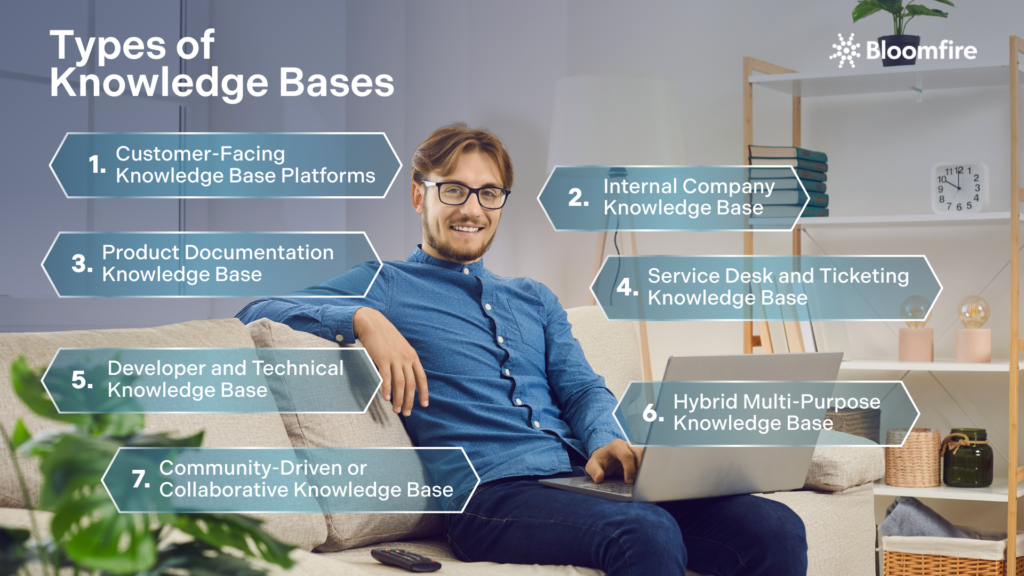
1. Customer-Facing Knowledge Base Platforms
Customer-facing knowledge base platforms function as public self-service portals where customers access information about your products and services without restrictions. These external types of knowledge bases remain available to anyone seeking answers, unlike internal systems reserved for employees. You’ll find them embedded on company websites, within products, or hosted at dedicated domains like support.company.com.
These platforms serve as virtual spaces containing user guides, troubleshooting procedures, FAQs, product documentation, tutorials, videos, pricing information, and terminology glossaries. The structure of customer-facing knowledge bases allows customers at any stage of their experience to find solutions on their own, whether they’re researching your company for the first time or troubleshooting a specific issue.
2. Internal Company Knowledge Base
An internal company knowledge base serves employees rather than external customers. It serves as a centralized repository where your team can access company information and departmental resources needed to perform their jobs effectively. This employee knowledge base stores policies, handbooks, training materials, standard operating procedures, and proprietary data for internal use only, instead of helping customers resolve product issues.

Your employees expect instant access to information. An internal knowledge base becomes valuable as a wiki for your workforce. The content ranges from employee handbooks and company policies to brand guidelines and software user manuals. Access permissions protect all of this to ensure information security.
You must clarify your purpose before implementation. You might build it for centralized information access, to improve employee onboarding and training processes, or succession planning. These goals needn’t be mutually exclusive, but clarity will match your efforts with organizational needs. The platform should function as a single source of truth. Employees find verified, up-to-date information there without hunting through emails or messaging colleagues.
Modernize Your Knowledge Base
Replace static folders with a dynamic, searchable home for all your company data.
Book a FREE Demo
3. Product Documentation Knowledge Base
Product documentation knowledge bases house technical information about how your software, application, or digital product functions. This knowledge base type is fundamentally different from general support content. It focuses on product-specific technical details rather than company policies or broad customer service topics. You create reference material that explains what each feature does, how users interact with specific functionality, and technical specifications that developers need for integration.
The content serves end-users who need step-by-step instructions to use your product successfully. Product documentation responds directly to customer feedback and usage patterns, unlike an internal company knowledge base built around what your team needs to know. This distinction is critical, given that 92% of consumers now say they would use an online knowledge base for self-support if it were available and tailored to their needs.
Your product documentation includes several distinct content types within this specialized category. Reference documentation explains individual features and their capabilities, serving as a core component of technical types of knowledge bases. Tutorials guide users through complete workflows from start to finish, while release notes detail new functionality, updates, and bug fixes from each version.
4. Service Desk and Ticketing Knowledge Base
Support teams face repetitive questions daily. They search through scattered documentation while customers wait for responses. Helpdesk knowledge base software addresses this problem. It integrates into ticketing workflows and allows agents to document solutions as they resolve issues. The system suggests relevant articles before tickets even reach the queue. This knowledge base type is different from standalone documentation. It embeds itself into your support operations rather than existing as a separate resource.
These platforms serve as both repositories and workflow tools. Agents create how-to content, FAQs, and troubleshooting articles that connect to ticket resolution processes. The system pulls relevant articles mid-conversation when customers or agents encounter issues. This transforms institutional knowledge into actionable solutions. No one needs to leave the ticketing interface.
Agents can also use a conversational AI tool to quickly surface answers in a format that allows them to relay them directly to the customer. An example of such a tool is Bloomfire’s Synapse.

The dual audience approach matters here. Your service desk knowledge base serves support agents who need quick access to proven solutions. It also serves customers who prefer to resolve issues through self-service portals. The same content library powers both internal agent responses and external help centers. This maintains consistency across all support channels.
Find Answers Faster with Synapse
Empower your CSRs with AI-driven answers delivered in real-time. Boost efficiency.
Learn More
5. Developer and Technical Knowledge Base
Technical teams require a specialized environment that prioritizes code snippets, API schemas, and system architecture over general prose. This type of repository functions as a living document for engineers, DevOps specialists, and data scientists who need to understand the how and why behind a build. It bridges the gap between high-level project goals and the granular execution required to maintain a stable digital infrastructure.
Documentation in these types of knowledge bases often includes complex elements such as interactive API consoles, SDK installation guides, and environment configuration instructions. Developers use these spaces to share tacit knowledge regarding legacy codebases or to document microservices that might otherwise become black boxes.
Searchability and structural logic are the most critical components for a technical knowledge base. Engineers often search for specific error codes or function names, making a robust indexing system a mandatory feature. A well-organized technical library reduces the need for constant shoulder tapping during deep work sessions, allowing the development team to remain focused on shipping features rather than explaining basic setup procedures to one another.
6. Hybrid Multi-Purpose Knowledge Base
Siloed information creates unnecessary friction between departments. A hybrid knowledge base solves this by merging internal employee resources with external customer support content into a single, unified ecosystem. This approach uses sophisticated permission layering to show different versions of the same information depending on who is logged in. A customer might see a simplified how-to guide, while an employee sees the same page of a customer support knowledge base with added internal notes and troubleshooting shortcuts.
Centralizing all data into a single platform simplifies management of the single source of truth. Updates to a core product feature need to be edited only once to reflect across both the public help center and the internal sales training manual. This strategy eliminates the risk of providing conflicting information to customers and ensures that every department—from marketing to support—is working from the same playbook.
7. Community-Driven or Collaborative Knowledge Base
High levels of community engagement and collaboration see a 10% increase in customer loyalty. Many organizations are shifting toward a collaborative model in which users contribute to the documentation. This type functions as a peer-to-peer repository where long-time customers or power users share workarounds, creative use cases, and localized solutions that a corporate team might miss.
Crowdsourcing information ensures that the library remains dynamic and reflects real-world applications. Moderation tools allow your staff to verify community answers, turning a simple forum into a trusted, authoritative source. This reduces the burden on your content team while fostering a sense of ownership among your most loyal brand advocates.
Trust grows when customers see a transparent exchange of information across various types of knowledge bases. A community-driven base often identifies bugs or feature requests faster than traditional support channels. The resulting content serves as a massive SEO asset, capturing long-tail search queries people use to describe specific niche problems in their own words.
Transforming Modern Types of Knowledge Base into a Dynamic Knowledge Hub
Building a resilient organization requires more than just selecting one or two of these categories; it involves weaving them into a unified ecosystem where information flows freely to those who need it most.
Transitioning from static documentation to a living, AI-powered knowledge engagement platform allows your team to break down silos and turn collective intelligence into a competitive advantage. When you consolidate your internal insights and external resources into a single, searchable environment—much like the integrated experience Bloomfire offers—you empower every stakeholder to contribute to and learn from a centralized source of truth.
Scale Your Knowledge Fast
Grow your business without losing your best ideas. See Bloomfire in action.
Talk to Our Expert
Providing clear, accessible information reduces the frustration and search fatigue that often leads to employee burnout. When staff feel empowered with the right tools to do their jobs effectively, their overall job satisfaction tends to increase.
New hires can use an internal portal to learn company culture, tools, and processes at their own pace. This reduces the training burden on managers and gets new employees up to speed much faster.
Many modern platforms allow organizations to host multiple knowledge types within a single, unified environment. With advanced permission settings, you can serve different content to customers, developers, and internal staff from a single central hub.
An external, customer-facing knowledge base integrated with a service desk is most effective for support teams. This setup allows customers to find self-service answers while giving agents quick access to troubleshooting scripts and FAQs.
Content should be reviewed on a recurring schedule or whenever a product update or policy change occurs. Regular audits prevent ROT (redundant, obsolete, and trivial) or the data graveyard effect, where users stop trusting the system due to outdated information.
A content management system (CMS) focuses on publishing web content like blogs, while a knowledge base focuses on information retrieval and organization. While they overlap, a knowledge base is specifically optimized for learning and support.
Betsy leads the customer success and implementation teams at Bloomfire and is a Certified Knowledge Manager (CKM) from KM Institute. Passionate about the people side of knowledge engagement and knowledge sharing, she brings real-world experience in tackling the challenges companies face with knowledge management.

Knowledge Management Cycle: From Theory to Real-World Implementation

Why SharePoint Cleanup Projects Fail

What Is Social Collaboration? Navigating the New Era of Digital Teamwork

Estimate the Value of Your Knowledge Assets
Use this calculator to see how enterprise intelligence can impact your bottom line. Choose areas of focus, and see tailored calculations that will give you a tangible ROI.

Take a self guided Tour
See Bloomfire in action across several potential configurations. Imagine the potential of your team when they stop searching and start finding critical knowledge.